Workflow programming
A readable language for repeatable numerical investigations.
Learn to use variables, arithmetic, conditions, loops, collections, user-defined functions, reusable numerical models and named solver jobs.
Start a workflow
Put workflow on the first line and write one statement per line. The language supports assignments, mathematical expressions, // comments and report statements. Indent nested statements for clarity and close each if, loop, model and job with end.
workflow
a = 2
b = 3
report a^2 + b^2
The report is 13. Workflow scripts can run from the Windows editor or from the command-line engine when installed and licensed.
An entire calculation inside one while loop.
For the birthday paradox, assume 365 equiprobable birthdays and independently sampled people. Multiply the probability of distinct birthdays until its complement reaches 50%. The result is 23 people and a probability of approximately 0.507297.
workflow
people = 0
distinct = 1
while 1 - distinct < 0.5
    distinct = distinct * (365 - people)/365
    people += 1
end
report people
report 1 - distinct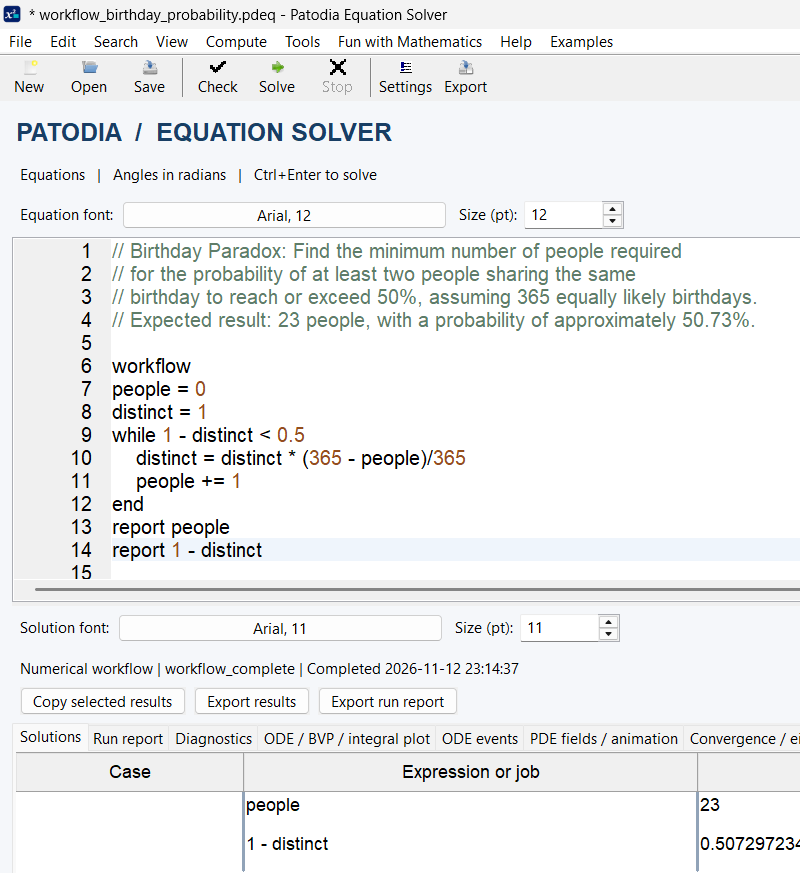
Control flow and mathematical functions
if/else conditionally executes statements; for visits a finite range or list; while repeats while its condition remains true. break leaves a loop and continue skips to the next iteration. A workflow also has a global execution-step budget and resource limits; a loop that never terminates is not guaranteed to complete.
workflow
function square(x) = x*x
total = 0
for i in 1..5
    if i % 2 == 0
        continue
    end
    total += square(i)
end
report total
This example reports 35, the sum of squares of 1, 3 and 5. User-defined functions are expression-based and accept explicit numeric parameters; they are not general nested statement blocks.
Collections, indexing and results
Collections use [] and list literals; append name with expression adds an item. count(name) returns the item count, and at(name, index) uses 1-based indexing. Values may also be records or nested collections, with dot fields for record access.
workflow
values = []
for n in 1..4
    append values with n^2
end
report values
report count(values)
report at(values, 3)
Expected reports: [1,4,9,16], 4 and 9.
Call a numerical service from a workflow
Write a service keyword followed by the result name. Inside the job, write that service’s normal settings without repeating its header. After end, inspect fields such as job.accepted, job.status, job.value or a service-specific job.result. Optional within budgets have service-specific behavior; consult the workflow guide.
workflow
quad area within 2
    expr = x^2
    var = x
    range = [0,3]
end
if area.accepted
    report area.value
else
    report area.status
end
The integral of x² over [0,3] is 9. An accepted job is not a proof of an exact or globally certified result.
Reusable models and parameter sweeps
Define a reusable service model at the top level with model name(parameters) as service. Its body uses @parameter substitutions. Invoke the model with run result = name(arguments). This makes repeated studies clearer than duplicating entire service blocks.
workflow
model power_integral(b) as quad
    expr = x^2
    var = x
    range = [0, @b]
end
values = []
for n in 1..3
    run area = power_integral(n) within 2
    if area.accepted
        append values with area.value
    else
        report area.status
    end
end
report values
Expected results are approximately [1/3, 8/3, 9]. The detailed run report stores job information, including status and diagnostics.
Using mathematical functions
Workflows can call shared-core mathematical functions and scalar Compute functions directly, subject to each function’s domain. Examples include sin(x), sqrt(x), exp(x), gamma(x), isprime(n) and primepi(n). Trigonometric angles are in radians.
Function catalogue: The full list is documented in the Workflow Guide and Compute Functions Reference. The Calculus & Functions page introduces the main families and links to the detailed resources.
Important language distinctions
var x,y in a standalone algebraic model is a presentation directive controlling solution-variable print order; it does not have to declare unknowns used in the equations. var = x in quadrature names the integration variable. a = 2 in a workflow is a numerical assignment. These are distinct uses in different model contexts.
Workflow scripts use explicit multiplication in arithmetic expressions, for example 2*x. Named numerical jobs have their own service syntax. To investigate parser, time or precision limitations, read the installed Version 4.0 Workflow Guide and run Check Syntax before solving.
Continue with the official workflow documentation
The Workflow Guide 4.0 PDF is available to read or download. Browse all six documents on the Resources page.
Open / Download PDF ↗