Multiple roots in one run
Search linear, polynomial and supported transcendental systems for distinct real solutions, using automatically generated starting points.
Precision · Discovery · Possibility
Patodia Equation Solver
Discover multiple real solutions without supplying an initial guess. Use the dedicated Windows desktop application for engineering and scientific work, or integrate the native engine into your own software under an OEM license.
Windows x64 desktop · OEM licensing · Native EXE & DLL
Normal precision · Binary128 refinement · No initial guess required

Find the alternatives
Model the relationships, define meaningful bounds and search for distinct approximate real roots — with residuals and stopping status to help assess each run.
Search linear, polynomial and supported transcendental systems for distinct real solutions, using automatically generated starting points.
Combine continuous, integer and binary variables with bounds and inclusive ≤ / ≥ conditions. Use pos int, neg int, nonpos int and nonneg int declarations to restrict integer domains.
Use double precision or binary128 refinement. Binary128 offers 113 significand bits, approximately 33 significant decimal digits of arithmetic precision.
Configure time allowance, starts, iterations, seed and solution count through the engine interface. Search budgets are cooperative time allowances.
Inspect residuals, per-root acceptance times, time to the last accepted root and stopping status through supported engine outputs.
Use the Windows desktop application or integrate the native engine into your own software under an appropriate license. JSON preserves extended-precision values as decimal strings.
New · Windows desktop application
A dedicated workspace for nonlinear equation systems. Edit your model, set physical bounds, solve in normal or extended precision, and inspect distinct real solutions in one application.
Version 1.0.4 · Windows 10 / 11, x64 · ZIP package · Standalone application
Automatic 14-day trial from first use for the current Windows account. No trial license file or machine fingerprint required.
Use the File, Edit, Search, Compute, Help and Examples menus. Open your own text models, save projects with settings and bounds, and work with syntax highlighting and line numbers.
Switch between double precision and binary128 refinement. Review variable values, maximum residuals and per-root acceptance times in a readable results table with wider extended-precision columns.
Export completed results to CSV or JSON, print a run report, and retain the model as a project. Choose US or EU number style to match your preferred decimal notation.
Actual desktop screenshots · Same model, two precision modes
This coupled system combines a sine term, an exponential term and a polynomial relationship. Both supplied screenshots show twelve solutions, with a reported solver runtime of approximately two seconds.
sin(x+y) - exp(x)*y = 0
x^2 - y = 2
bound y = [0, 40]
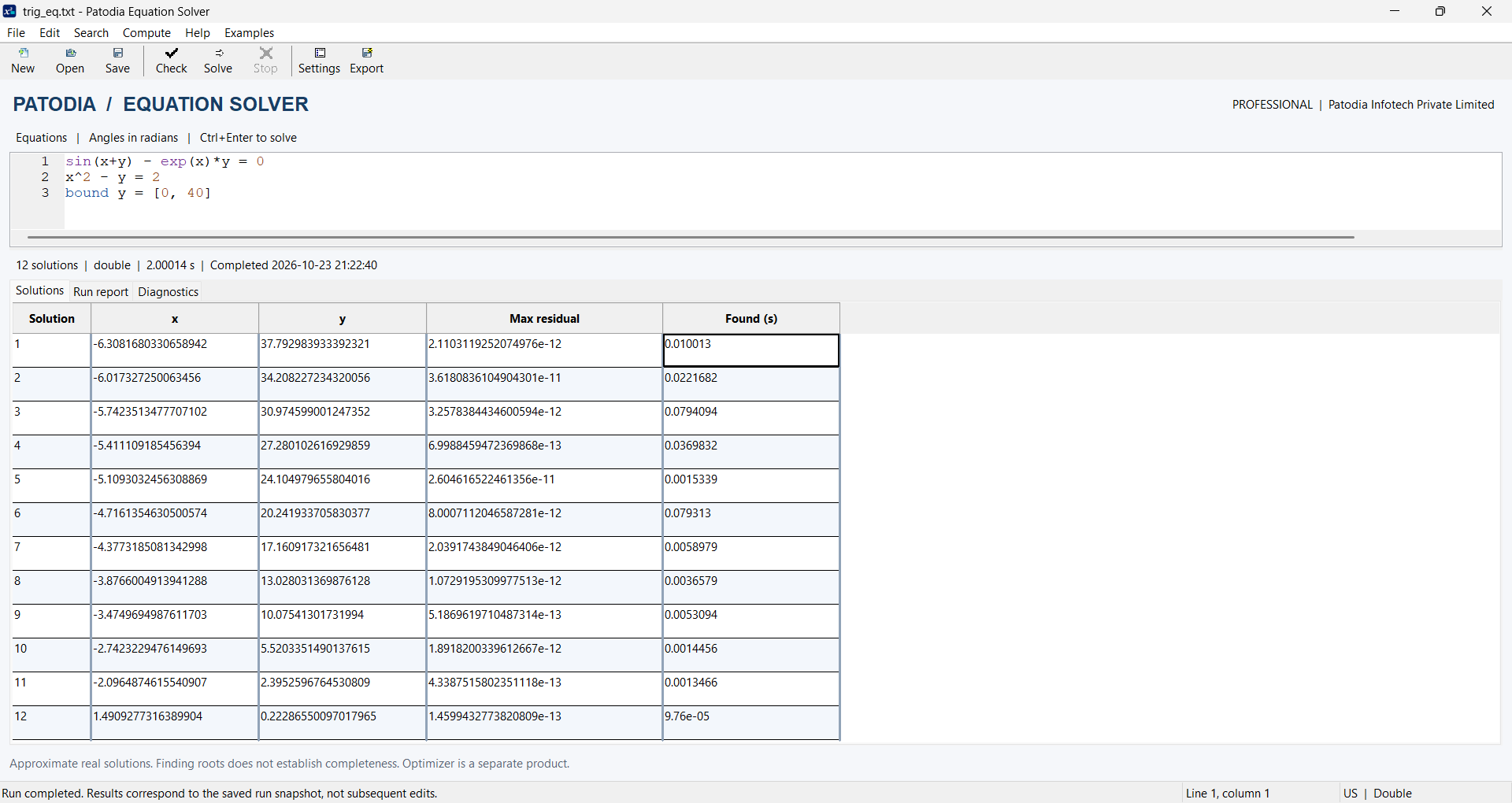
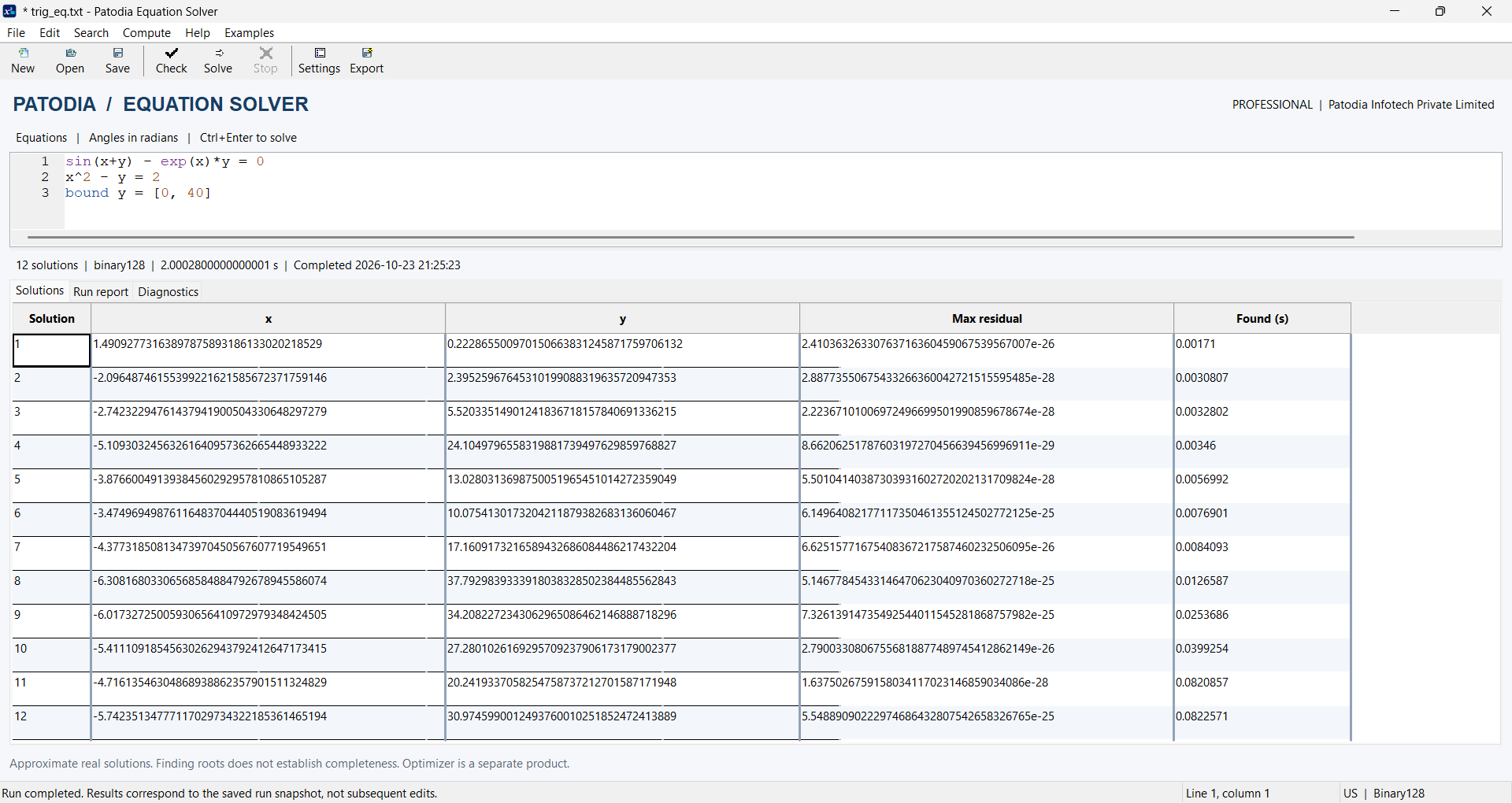
Screenshots supplied by Patodia Infotech. Timings and residuals are reported by the application; hardware details and total launch-to-result time are not provided. A small residual is a numerical check, not a guarantee of the same number of correct digits in a root. These runs do not establish that every root was found or guarantee performance on other models.
Start in minutes
PatodiaEquationSolver.exe.For individuals and institutions
Commercial licenses support normal-precision desktop solving. Professional adds extended precision and agreed internal DLL integration rights.
Departmental and campus academic licenses cover all eligible users in the named scope, including university and personal computers. The common signed institutional license has an annual expiry and requires no machine fingerprint.
Discuss desktop or academic licensing ↗Numerical flexibility
From simple equations to coupled nonlinear systems, use a readable model with the supported functions your problem needs.
Arithmetic, powers, named constants such as constant a = 5, b = 7;, scientific notation, comments and implicit multiplication are supported. Functions include sin, cos, tan, log, exp, sqrt, abs, atan2, min and max.
Functions require valid real domains. Angles are in radians. Expression availability differs between ordinary numerical solving and optional verification backends.
equation_solver.exe "x^2=2; x>=0" --extend --json --seconds 2
Illustrative Windows command, run from the engine’s bin folder. Normal default residual tolerance: 1e-9. Extended default: 1e-24. A small residual does not guarantee equivalent accuracy in the unknowns.

Go beyond the first answer
Evaluate alternative mechanism configurations, steady-state process equations, equilibrium relationships and calibration models using representative problems from your domain.
For software developers
Extend your engineering or scientific software with multiple-solution discovery. Discuss an OEM license for the native Windows x64 Equation Solver engine.
Use the command-line executable or C-compatible DLL to pass equation models and receive structured results. JSON preserves extended-precision values as decimal strings.
Explore continuous, integer and mixed-integer equation systems, variable bounds, inclusive constraints and binary128 refinement within your own workflow.
Share representative equations, your platform, expected deployment and redistribution requirements. We will discuss evaluation, integration support and OEM commercial terms.
Embedding and redistribution rights are agreed separately from individual desktop and academic licenses.
Discuss OEM licensing ↗Questions, answered
Yes. Download the Windows x64 desktop ZIP, extract all files together and open PatodiaEquationSolver.exe. The application includes an equation editor, search settings, bounds, solution tables, reports and CSV/JSON export.
No. Version 1.0.4 starts a full-featured 14-day trial automatically on first use for the current Windows account. No trial license request or fingerprint is needed. Reinstallation retains the trial dates. An existing installed license retains its original terms; an expired or invalid installed license must be renewed or resolved.
Yes. A departmental or campus agreement covers all eligible users within its named scope. The institution distributes one common signed license file to authorized students and staff; each Windows account activates that file once through Help → Activate Licence. These institutional licenses have a signed annual expiry without machine binding.
Yes. Open plain-text equation files through File → Open, or save a project containing equations, settings and bounds. Choose US style for decimal points, or EU style for decimal commas and semicolon-separated function arguments and bound endpoints.
No. The engine generates starting points and explores search ranges automatically. Supplying meaningful bounds can help focus the search on the physically relevant domain.
General numerical search seeks distinct approximate real roots within configured search limits. It does not guarantee that every root has been found. Feasible points from a continuous region are samples, not an enumeration of that region.
The engine searches real-valued numerical solutions. It does not provide symbolic algebra or complex-root solving.
Yes, native integration can be evaluated through the Windows executable or C-compatible DLL. Contact us about the appropriate build, matching interfaces and commercial embedding or redistribution terms.
The normal engine uses double precision. Extended mode uses double candidate discovery followed by binary128 refinement and verification. The native engine also offers optional binary128 discovery. Numerical conditioning, input accuracy and search success remain separate considerations.
Bring your equations
Share a representative model, your platform and the results you need. We’ll discuss the desktop application, an academic license or an OEM integration evaluation around your workflow.
Discuss your requirements ↗Email panna@patodiainfo.com
Windows desktop, academic deployment or OEM integration into your application.
Include equations, variable domains and acceptance criteria.
Inspect valid roots, residuals, discovery times and integration effort.